Dear Fia, Why don’t you need my email?
PrivacyNote
A period tracker with no account: what you keep, and what you give up
A period tracker with no account asks for no email and no password. How Fia works without one: where your logs live, how to move phones, and the trade-off.
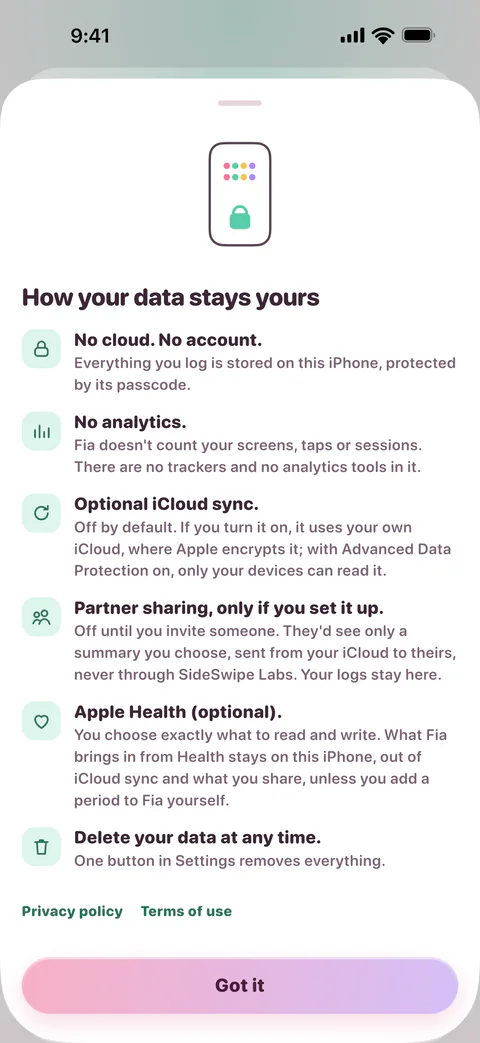
A period tracker with no account has no sign-up screen: you open the app and log your period. Fia works that way, and it doesn’t ask for an email address or a password later either. That changes where your logs live, how you move them to a new phone, and who could ever be asked to hand them over.
Why an account matters in a period tracker
An account is a record with your name, email address or phone number on it. When a tracker keeps your logs on its servers under that record, the company holds your cycle with your identity attached, and how private it stays depends on what the company does with it, now and later.
That has gone wrong before. Of the 23 most popular women’s health apps in one review, 20 shared user data with third parties Alfawzan et al., 2022.
One way out is to unlink your name. Flo’s Anonymous Mode does that: it stops linking your identity to your health data, and in Flo’s words, if it receives an official request for data in that mode, it won’t be able to provide it (Flo). A tracker with no account starts from there, because there was never a name to unlink. Fia as a Flo alternative compares the two in full.
Where your logs live in Fia
Fia keeps your logs on your iPhone or iPad, under iOS’s complete file protection. Every other place in this table is one you choose, and the last row is the point of having no account.
| Where | When | Who can read it |
|---|---|---|
| Your iPhone or iPad | Always | Whoever can unlock it. App Lock adds Face ID or Touch ID each time Fia opens |
| Your iPhone’s backups | Unless you turn on Keep out of iCloud Backup | You. In iCloud, Apple holds the keys unless Advanced Data Protection is on |
| Your iCloud, with sync | Only if you turn on iCloud sync | You. Apple encrypts it, end to end with Advanced Data Protection on |
| People you share with | Only if you invite them | Each of them, and only the summary you choose for them |
| Apple Health | Only if you connect it, and only what you choose | You, and the apps you allow to read it |
| A backup file | Only when you make one | Whoever has the file and its passphrase |
| SideSwipe Labs | Never | Nobody here: nothing you log comes to us |
Apple’s iCloud security overview lists who holds the keys for each kind of data Apple, and Fia’s privacy policy has the rest.
What an account usually does, done without one
An account usually exists so you can get your logs back, use more than one device, share them and leave. Fia does each of those without one.
- A new iPhone. Restore it from a backup of your old one, or turn on iCloud sync on both. Or, since Fia 1.1, make a file: Settings → Privacy → Back up to a file on the old iPhone, and Restore from a backup on the new one. The file is sealed on your iPhone with AES-256-GCM, under a key made from a passphrase only you know. Fia keeps no copy of the passphrase and never uploads the file, so without the passphrase nobody can open it NIST, 2007 Apple. Periods Fia read from Apple Health aren’t in a backup: bring them in again on the new iPhone, in Settings → Apple Health.
- Your iPhone and iPad together. Turn on iCloud sync on both. It uses your own iCloud, never a server of ours.
- Sharing. In Your people, make a one-time link and send it to the person you mean. It lets in the first Apple Account that opens it, and closes after 7 days or once it’s used. What you share goes from your iCloud to theirs Apple. Sharing is for adults, 18 and over, on both phones, and it’s free for them.
- Leaving. Settings → Privacy → Export my data makes a PDF or CSV on your iPhone. Delete all data removes your logs from your iPhone, and from your iCloud if sync is or has been on, and ends all sharing. Copies in older backups go as those backups are replaced.
The trade-off
No account means no copy anywhere for us to restore from. If your iPhone is lost or reset and you had no backup, no iCloud sync and no backup file, your logs are gone, and we can’t bring them back: we never received them. Turn on one of the three, whichever you trust. Support answers the questions people ask most.
Fia is also only for Apple devices: iPhone and iPad, with an Apple Watch app. There’s no web version and no Android app. You need an Apple Account to download it, as you do any app from the App Store, but Fia itself asks you for nothing.
How to tell if a tracker needs an account
Before you install one:
- Read the App Privacy section of its listing. Contact Info under Data Linked to You means the app collects your name, email address, phone number or the like, and ties it to you (Apple).
- Look at its screenshots and description for a sign-up or sign-in step.
- Check its help pages for how you get your logs back on a new phone. If the answer is to sign in, your logs are on its servers.
How to find a private period tracker puts the labels of eight popular trackers side by side, and what “Data Not Collected” means goes through Fia’s.
Questions
Do I need an Apple Account to use Fia?
You need one to download any app from the App Store. Fia itself asks for nothing. iCloud sync, sharing and your iPhone’s iCloud backups use the Apple Account your iPhone already has.
Can I use Fia without iCloud?
Yes. iCloud sync is off until you turn it on, and everything but sharing works without it. To move to a new iPhone without iCloud, use a backup file.
Can SideSwipe Labs recover my logs?
No. We never receive your logs, so there’s no copy for us to restore. A backup you made may still hold them.
Does Fia need an account to predict my period?
No. Fia works out your next period on your iPhone, from the periods you log, and the range narrows as you log more. Why a range, and not a date explains how.