Dear Fia, Who else can see this?
PrivacyNote
What “Data Not Collected” means for your period tracker
Fia’s App Store label says Data Not Collected. What that means, where your logs live, and what leaves your iPhone only if you choose.
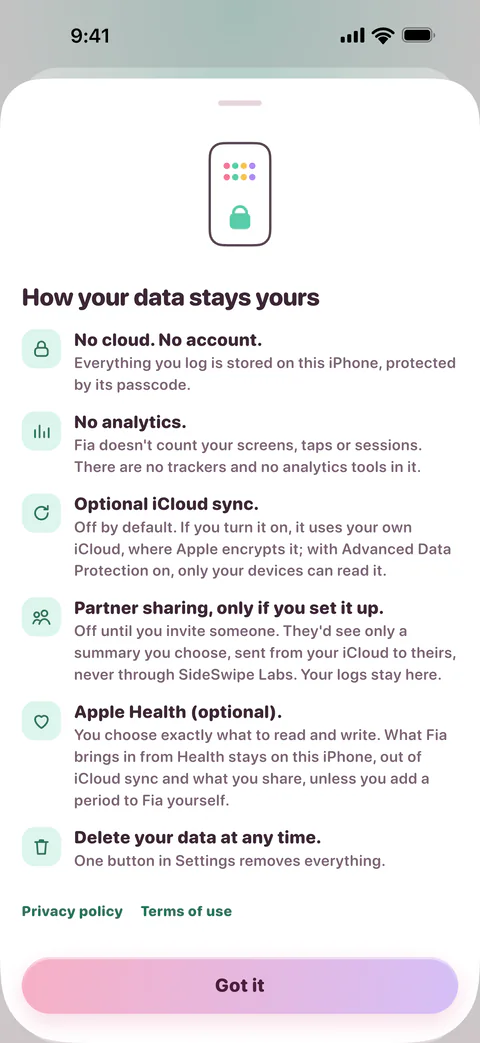
A period tracker can hold the most private details of your life: your periods, your moods, your symptoms, whether you’re trying to get pregnant. So it matters where that goes. With Fia, it stays on your iPhone, and in its backups, unless you send it somewhere yourself.
What the label means
Every app on the App Store has a privacy label, filled in by its developer, that says what data the app collects. Apple counts data as collected when it leaves your device in a way that lets the developer, or anyone they work with, get at it for longer than it takes to answer a request (Apple’s definition).
Fia’s label says Data Not Collected, for the simplest reason: Fia has no account, no ads and no analytics, and SideSwipe Labs has no server that holds your logs. Fia doesn’t count your screens or taps, either.
That’s not the norm. Of the 23 most popular women’s health apps in one review, 20 shared user data with third parties Alfawzan et al., 2022. In 2021, the US Federal Trade Commission said that a popular period tracker had shared sensitive health data from millions of users with companies including Facebook and Google, after promising to keep it private FTC, 2021.
Where your logs live
On your iPhone, protected by its passcode. Three things can send some of what you log elsewhere, and each is off until you turn it on:
- iCloud sync uses your own iCloud, where Apple encrypts it. With Advanced Data Protection on, it’s end-to-end encrypted, so only your devices can read it Apple.
- Apple Health reads and writes only what you choose. Periods Fia reads from Health stay on this iPhone, out of iCloud sync, backups and what you share, unless you add one to Fia yourself.
- Sharing sends a summary you choose, from your iCloud to the people you invite, up to five of them. It never goes through SideSwipe Labs, and only the people you share with can read it Apple.
Like everything on your iPhone, your logs are in its backups too, and Fia has a switch to keep them out.
Fia’s own summary of where your data goes, and what stays put.
Private from the people around you
Privacy isn’t only about companies. A phone is easy to pick up. App Lock asks for Face ID or Touch ID each time Fia opens. Discreet Mode uses plain words, even in notifications, and a plain gray icon is there if you want one.
Sharing is careful for the same reason. Research with survivors of abuse found that abusers mostly use the ordinary features of apps and accounts they’ve been let into Freed et al., 2018. California’s Attorney General settled with one fertility app whose partner feature, until 2016, linked anyone who asked and shared what a user logged without her approval California Attorney General, 2020. Researchers recommend letting people change what they share discreetly, and asking again over time whether they still want to Levy and Schneier, 2020.
So in Fia, an invite link lets in one Apple Account, and you see whose it is. Pausing or stopping notifies nobody, sharing more asks for Face ID, a shared fertile window estimate turns itself off after 90 days, and Fia asks every 90 days whether you still want to share.
What SideSwipe Labs can’t see
Anything you log. We don’t hold your logs, so there’s nothing for us to sell, share or hand over, and no account to tie them to you. If you want everything gone, one button in Fia’s settings deletes it from your iPhone and your iCloud, and copies in older backups go as those backups are replaced.
Questions
Does Fia sell my data?
No. Fia collects none, so there’s nothing to sell. It has no ads and no analytics.
Do I need an account?
No. Fia has no sign-up and no email to give.
Can my partner see my period?
Only if you share with them, and only the summary you choose for them. You can pause or stop at any time, and stopping notifies nobody.
Does Fia work without iCloud?
Yes. iCloud sync is off until you turn it on, and everything but sharing works on your iPhone without it.